
Hysteris Instruction manual
Knobs, functions, and locations
Gain: Adjusts the preamp gain (Top Left)
Stability: Adjusts the character of the distorting amplifier (Bottom Middle)
Blend: Adjusts the mixture of the preamp and distorting amp signals, clockwise adds more of the distorting amp. (Top Right)
Level: Adjusts the overall output level (Middle Left)
Tone: Reduces the high frequencies in the output, clockwise lowers the cutoff frequency (Middle Right)
Behavior and usage tips
Hysteris is designed to operate well outside the behavior of a conventional distortion pedal. While it can produce familiar overdrive and distortion sounds, much of its character comes from deliberately pushing the circuit into regions where its response becomes nonlinear, dynamic, and sometimes unstable.
Some control combinations can produce gating, sputtering, abrupt changes in gain, shifting harmonic content, compression, or textures that seem to “break” the signal. This is intentional. Hysteris is meant to reward experimentation rather than behave predictably at every setting.
Signal Flowchart
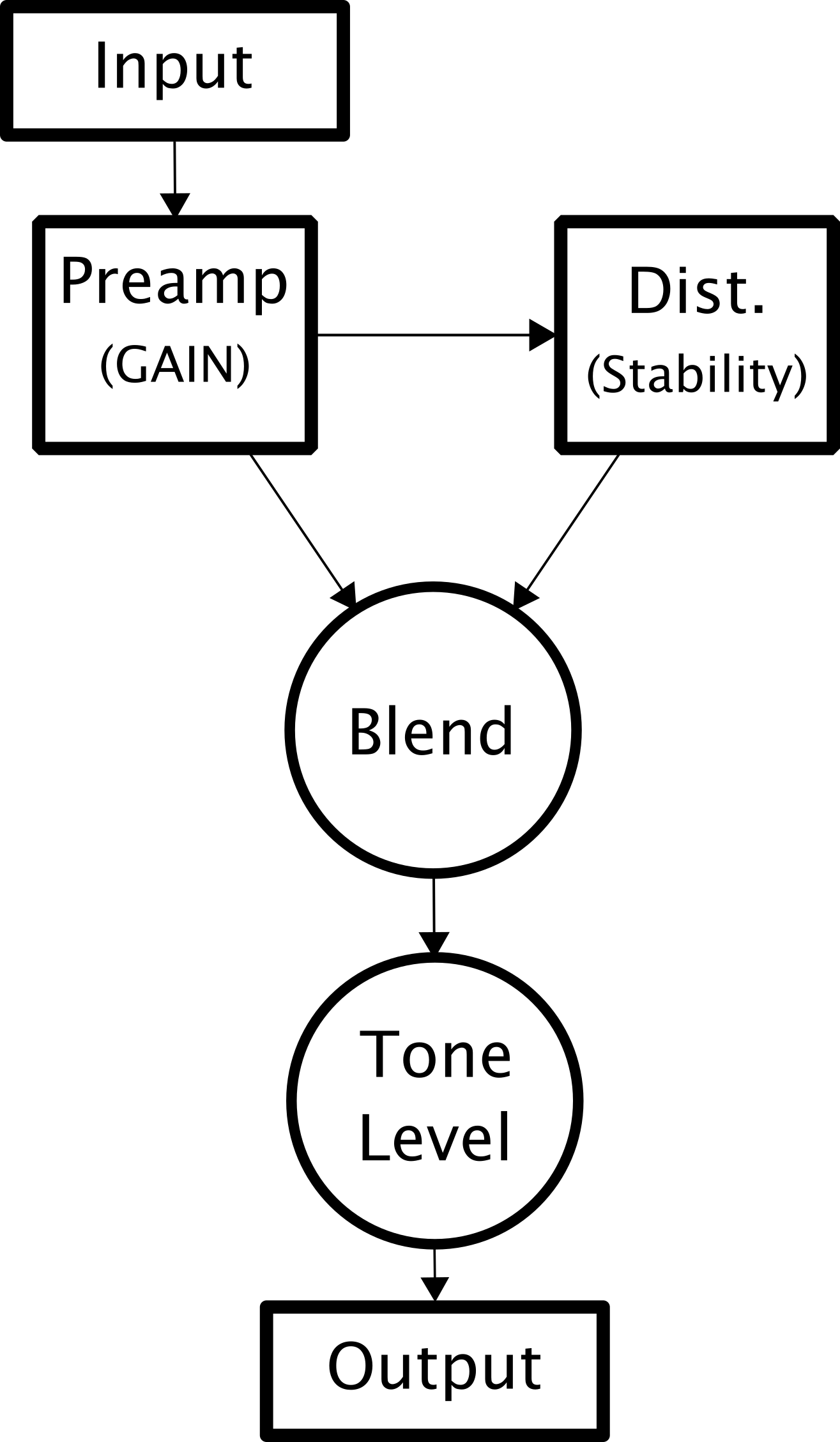
For a more conventional starting point, set all controls around noon. Begin by adjusting Gain and Tone to establish the basic amount and character of distortion, then experiment with the Stability control.
As the Stability control is lowered, the circuit is allowed to operate in progressively less stable regions. The effect is highly dependent on the amount of Gain, the level of the incoming signal, and your playing dynamics. Small changes in knob position or pick attack can sometimes produce large changes in the resulting sound.
At moderate settings, lowering Stability may primarily alter the harmonic character and feel of the distortion. At more extreme settings, notes may gate abruptly, decay unevenly, sputter, or transition between different distortion behaviors. Hard and soft picking may produce noticeably different textures even without changing any controls.
Because the controls interact with one another, there is not necessarily a single predictable result from changing one knob. Increasing Gain, for example, may change how the Stability control responds, while changing your guitar's output level or volume control can move the circuit into a different operating region entirely.
The Blend control can be especially useful when exploring extreme settings. Mixing some of the preamp signal back into the distorted path can restore note definition and attack while retaining the unstable texture underneath. This makes sounds that may initially seem unusable much easier to incorporate into riffs, chords, or layered parts.
If a setting sounds broken, play through it before turning the knobs back. Try varying your pick attack, guitar volume, or the Stability control by a small amount. Some of the most distinctive sounds in Hysteris occur near the boundaries between stable and unstable behavior.
There are no “incorrect” settings. If the pedal suddenly reacts differently than expected, it may be doing exactly what it was designed to do.